Key Highlights
- Learn how clickers for classroom can transform chaotic, large classrooms into streamlined environments fostering active learning.
- Explore the challenges that educators in India face with student engagement during class time and how clickers provide solutions.
- Compare physical clickers with app-based student response systems to decide what suits your needs.
- Get actionable tips on integrating purposeful activities like formative assessments using clickers for effective classroom management.
- Understand how clickers track student participation and enhance critical thinking through active learning strategies.
- Find answers to FAQs about costs, technical troubleshooting, and mobile app compatibility for classroom clickers.
Introduction
Handling big classrooms can be hard. Clickers for classroom help make things easier. They give a way to get student response and keep everyone joining in, without losing class time. These student response systems, like clicker devices or apps, let teachers get answers from students right away. This helps every student be heard in the classroom. When teachers use this technology, they can deal with the problems of teaching many students. It also helps make learning fun and useful for everyone.
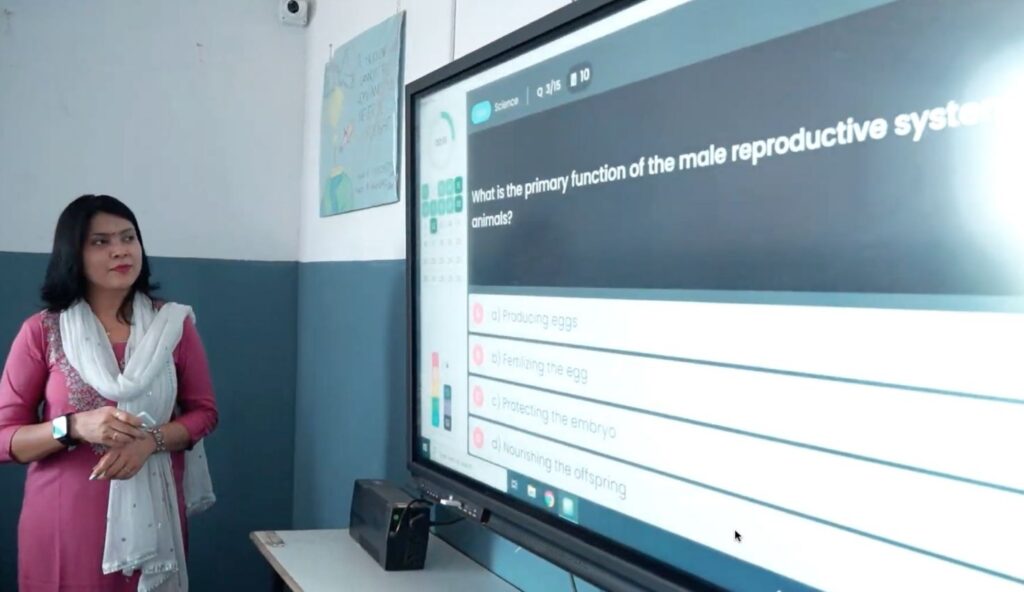
Understanding the Challenges of Large Classrooms in India
Indian educators often have to handle larger classrooms. They can find it hard to connect with specific students when there are so many people in the room. It is not easy to keep classroom engagement high and to deliver all the course content at the same time.
There is also another challenge when it comes to class time. It can be hard to make sure everyone has an equal chance to join in. Some students in the back might not feel involved, and the ones who talk more can take over the discussions. Because of this, there is not enough balance when students take part, which can hold back student success and what they get to learn. So, educators need new and better ways to help bring all students together and improve learning for everyone.
Common Issues Faced by Teachers
One thing teachers deal with again and again is getting answers from most students in a class. This is even harder in larger classrooms. There may be just a few who talk, and the rest do not join in. This can get in the way of good classroom engagement. To have real learning happen, everyone has to take part.
It can also be tough to handle formative assessments while teaching. If there are no good tools, teachers have to check every answer by hand. When there are hundreds of learners, this takes up a lot of class time. It gets hard for a teacher to stay focused on the course material, and the work starts to pile up.
Managing the whole class becomes harder when there are so many people. Teachers have to meet the needs of every student and also help them to do some critical thinking. Keeping everyone interested is not easy. Classroom response systems can help with this. They make it simple for students to join in and let teachers pay more attention to what matters most. This helps keep students on track and gives teachers back some time.
The Impact on Student Engagement and Learning
When student engagement is low, learning outcomes can get worse. In larger classrooms, not giving enough chances for students to join discussions or answer polls holds back student success. When there is not much interaction, students tend to be passive. This means their understanding of the lesson is not deep.
When teachers use interactive tools like student response clickers often, students get to answer more. They also learn key ideas better and take part in talks. This helps create a space for active learning strategies where the class practices critical thinking and problem-solving.
Also, using student response systems helps more students join in and share what they think. This makes the classroom fair for everyone. In the end, regular engagement helps the majority of the class understand lessons better, and it raises student success for many students.
What Are Classroom Clickers?
Classroom clickers, which people also call student response systems or audience response systems, are tools to help teachers handle big classes. These can be handheld devices or work as an app. They let you run polls, give quizzes, and get feedback from students right away.
Teachers can change the way they teach by using classroom clickers to boost active learning. They might use real devices or pick a digital app instead. These tools make it simple to get student response, check who takes part, and change the lesson as needed for their class.
Definition and Core Features
Personal response systems, such as classroom clickers, are small tools that help to record and look at student feedback. You can use them to ask clicker questions during class. These questions can be multiple-choice or need a number as an answer. They help to keep student engagement high.
Classroom response systems have some main features. They collect responses from students in real-time, keep track of who takes part, and work well with formative assessments. Most clickers use infrared or radio waves, but some new ones run as apps on smartphones or tablets. These systems make the way teachers give lessons easier and represent a turning point in how active learning strategies are brought into the classroom.
Clickers are great tools for building inclusive classrooms, where everyone has a chance to join in. With them, educators can work on building students' critical thinking, improving outcomes, and getting more students to take part during class time.
Types of Clickers Available (Physical Devices vs. Apps)
There are many ways to use student response systems in the classroom. These options fit different teaching styles and what people like to use. For example, you can use physical devices like infrared clickers. These let the majority of the class give real-time feedback. This helps to boost student participation and engagement.
A great example of a hybrid approach isClass Saathi by TagHive, which combines both physical clickers and a mobile app to maximize flexibility for schools and teachers. Its Bluetooth-based technology ensures easy setup and reliable performance across diverse classroom settings.
There are also apps for smartphones and tablets. These apps make classroom response systems even more useful. Teachers can conduct formative assessments and make learning more interactive. With platforms like Class Saathi, students can also engage from outside the traditional classroom environment.
Picking between infrared clickers and apps depends on your classroom needs and the course material you teach. Each student response tool, including Class Saathi, has its own benefits and learning curve.
Why Use Clickers for Classroom Management?
The use of clickers changes how teachers manage classrooms. They make course material more fun and draw students in. These tools fit right in with lessons, and help teachers see student participation and use active learning.
Clickers make it easy to take attendance, check student understanding with formative assessments, and get class talks going. This helps teachers get more class time for teaching. They also help make things fair, since they bring out ideas from specific students. Even in larger classrooms, they let more people join in. With all these things, students get a more set and strong learning path.
Enhancing Real-Time Interaction
Real-time interaction with clickers lets teachers see how much classroom engagement there is as it happens. With student response systems, teachers can ask questions that get the majority of the class to join in right away.
These interactive sessions are more lively. Students get to share their thoughts or show what they know using student response devices. This kind of feedback can lead to good classroom talks and moments of active learning. It helps students use critical thinking at the same time.
The best part is teachers get instant feedback. This helps them change their teaching to help students where it is needed. That way, everyone gets a better chance to understand the lesson.
Tracking Student Participation Effortlessly
With student response systems like clickers, it is easy to track how much people join in during class, even in larger classrooms. These tools record what students say or pick during class games and formative assessments. This helps teachers see student response and check who takes part in that moment.
These systems also make things quicker by cutting out a lot of work that comes with checking everything by hand. Teachers get to find out fast who gets involved and who does not. This lets the teacher know who to help more and who gets it. When you use this, all students can have a better chance at student success.
Also, clickers give real-time data about a class. Teachers get to look at the results as soon as the students use their clickers. Now a teacher knows what works in course content and can make lessons better for everybody’s needs.
A Beginner’s Guide to Getting Started with Clickers
Getting started with clickers means you have to know about the learning curve. You will need to help students get used to new tools in the classroom. To start, check that you and the students have devices or apps that will work with clickers. The right tools will help you use clickers easily with your course content.
An excellent example isClass Saathi by TagHive, which offers an easy-to-use hybrid solution involving both physical clickers and app-based functionality. It’s designed to minimize the learning curve, especially in schools new to classroom technology.
After that, you should learn about some important parts, like how to track responses and how to use clickers for attendance. These tools can make classroom work easier for you. Setting up clickers in the right way can help you get feedback from students and also increase classroom engagement. Now, let’s look at what you will need to use clickers the right way in your classroom.
Essential Equipment and Resources Needed
To begin, teachers need a clicker system to handle how students give answers in class. This system often includes:
- Clicker device: This can be a small remote or an app that students use. For example,Class Saathiprovides a Bluetooth-based clicker that pairs with an app, enabling smooth participation even in low-resource settings.
- Receiver or app software: This takes in and checks student answers. It can also work with tools like PowerPoint to help run your class. Class Saathi’s receiver plugs into any laptop and syncs instantly with the system.
- Technical support: There is help if any issues come up in the classroom. TagHive offers support and training resources with Class Saathi.
- Optional components: You might need screens or extras like timers, especially in big classes.
Some clicker systems give you free shipping when you buy for the first time. With the right setup, teachers can use clickers and apps to make fun lessons that get people involved.
How to Choose the Right Clicker System for Your Classroom
When you pick the right clicker system, think about the size of the classroom, the way you teach, and if there could be any problems with interference. Physical clickers, such as ones that use infrared or radio signals, can have some disadvantages like signal delays.
Class Saathiuses Bluetooth-based technology, which is less prone to interference and works reliably in large classrooms or semi-urban areas with limited internet.
App-based clickers work well in bigger classes or in hybrid setups. These let students take part using their smartphones or tablets. There are also hybrid clicker systems that let you use more than one way to connect.
It is important to check pricing, how easy it is to use, and if everyone can get to the system. Class Saathi stands out as an affordable option with multilingual support and simple UI. Make sure you use a clicker that fits your group and environment, so your lessons help get more student participation.
Step-by-Step Guide: Implementing Clickers in Your Large Classroom
To start using clickers in big classrooms, you need to make student response systems work well. The goal is to help with managing the classroom. You first need to get the right devices, then connect student response systems to tests. This way, things will go well and stay on track.
You should take easy steps, like showing how the clicker and the apps work to students. You also need to create good clicker questions. Doing this will help you get helpful answers. Let's talk about how to set up the clicker devices and apps now.
Step 1: Setting Up Clicker Devices or Apps
For physical clickers, plug a receiver in near your computer. Make sure the devices you use can work with the system. Hybrid systems need a simple app added to student smartphones or tablets.
Class Saathi requires only a small USB dongle and a mobile app. Students don’t need the internet, which makes it highly scalable in Indian schools.
When it is ready, set up the student response system using the course content you want to use in the semester. You can add quizzes, polls, and other lively activities to the platform.
Check that your app or device setup lets you easily track every learner during class. Next, we’ll get into how to show clickers to the class.
Step 2: Introducing Clickers to Students
The introduction should show how using these tools can help with student participation and make classroom engagement better. Start by showing some interactive activities during class time. Make sure every student knows how to use the response tools and what to do.
With Class Saathi, students can simply press a button to respond. Teachers can display live results and motivate more learners to join the conversation.
Talk about the good things that come with active learning. Link these active learning strategies to what students want to achieve in their education. Begin with simple icebreakers or polling questions to help students get used to the technology.
Tell them these clickers are for helping them learn better. They are not just for quizzes. The main goal is to help every student join in and be active in the class. Next, you can look at ways to plan these activities.
Step 3: Designing Effective Questions and Activities
When you make clicker questions, try to blend the course material into the interactive parts of your lesson. You can use quizzes as formative assessments. This helps students remember what they learn and makes things stick better.
Add different types of questions. You could use multiple-choice to check if students understand. You could use number-based answers when you want them to use critical thinking. Try to keep a good balance between simple and deep questions so they fit what level of thinking you want.
Class Saathi’s teacher dashboard makes it easy to create and deliver such questions quickly. It also stores all questions and performance history for later review.
Also, group polling and getting feedback from students can make the whole class more interesting. Use different types of clicker questions, so students stay active and want to answer. Afterward, you should look at their answers to know how the learning is going.
Step 4: Analysing Responses and Adapting Your Teaching
Classroom clickers help you get data about what students think. When you look at this feedback, you see how well your course content is working. You also find out what needs to change.
With Class Saathi, teachers receive instant insights into how the class is performing—per student, per topic. This data-driven feedback loop lets you improve teaching based on actual responses.
Use the data from classroom clickers to change your lesson plans. This helps learners in the classroom understand better. If the results are different for specific students, you can change how you teach or add new activities just for them.
Using classroom clickers in this way lets everyone join in more during lessons. It also helps improve student success. When you use these new ideas based on data, you make teaching better and help all students do well.
Tips for Maximising Engagement with Clickers
Maximising engagement starts when you make classroom activities more interactive, and when you let students give honest answers. You can do this by using active learning. One great way to use active learning strategies is with clickers, which help students go from sitting and listening to being part of the lesson.
You can use things like fun quizzes and polls that keep students anonymous. Change up the techniques you use to better reach what students like. Let's look at ways to make lessons more engaging and help students take part honestly. These steps can help everyone have a better time in the classroom.
Making Lessons Interactive and Fun
Interactive lessons with clickers make classroom time more valuable. There are some simple ways you can do this:
- Quiz gameshelp bring in some friendly competition and make it easy for students to remember what they learn.
- Quick pollson the topics from the lecture can start good conversations.
- Icebreakershelp everyone get comfortable before moving on to big ideas.
- Real-time predictionsgive students a chance to join in live class debates.
Using different interactive formats helps the course content feel new and exciting. People get curious and want to join in, which is what you want during the lesson.
Encouraging Honest and Anonymised Responses
Students may not want to share what they really think. Clickers help with this by letting students give answers that no one else can see who gave them. This makes it a safe place for people to speak up and say what is really on their mind.
You can ask questions about tough topics and get many different answers using clicker questions. This open way of getting ideas helps with critical thinking and lets more people join the talk.
When answers are hidden, students feel less worry about what others think. This helps them join in and try their best on formative assessments and during talks in class. Using clicker questions lets you get fair feedback from everyone. It helps make the class better for all students and improves the way they learn together.
To sum up, using clickers in big classrooms can change the way teachers and students learn and work together. Clickers help everyone join in by making it easy to interact in real-time. They also help track student participation without much effort. This tool keeps things from getting out of hand when there are a lot of people in the room.
When you set up clickers, introduce them to your students first. Take time to explain how they work. Make good questions for the students to answer during class. This creates a space where all students can be active in their learning, and every person gets the chance to speak up.
Tools likeClass Saathi by TagHivemake this process even easier by combining app-based and device-based systems, giving schools a flexible way to improve engagement and learning outcomes.
If you want to make your teaching better and get more student participation, trying clickers is a good idea. It will help your classroom be more fun and make sure that everyone has a voice.