Key Highlights
- Clickers for classrooms are driving innovation, boosting student engagement and transforming formative assessments.
- Educators leverage clicker systems like Class Saathi for real-time feedback, improving understanding through instant knowledge checks.
- These tools encourage active learning and critical thinking among students while fostering deeper comprehension of course material.
- Seamless integration with lesson plans optimises teaching methods, bridging gaps in student understanding.
- Personalised learning takes centre stage as clickers adapt to individual student needs with ease.
Introduction
Imagine a classroom full of energy. Students take part in lessons, answer questions, and join in on talks. Clickers for classroom have changed the way we see student engagement and formative assessments, ultimately impacting student success. These classroom clickers help make active learning possible. With these easy tools, students give answers to questions right away. This gives teachers helpful information about the students' learning process.
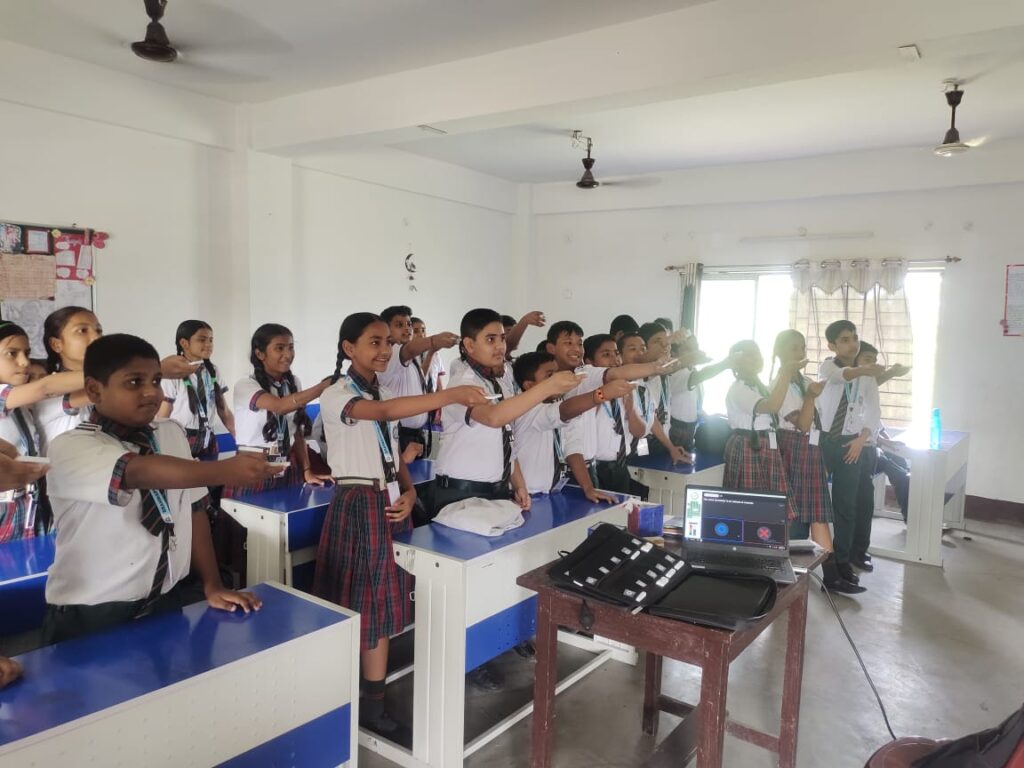
When a classroom uses clickers like Class Saathi, it becomes lively and simpler for teachers to handle everyday work. Clickers help the teacher adjust lessons to fit what their students need. In the next part, we will talk more about how classroom clickers act as powerful tools to check student progress during normal days.
What are clickers and how do they work in a classroom setting?
Clickers are handheld devices used in classrooms to facilitate real-time interaction between teachers and students. They allow students to respond anonymously to questions posed during lessons, providing instant feedback. This technology enhances engagement, assesses understanding, and encourages participation, making learning more dynamic and interactive for everyone involved.
Understanding Clickers as Daily Diagnostic Tools
Classroom clickers help bring teaching and learning closer together. They turn a regular class into a more lively and active time. When teachers use clicker questions, they can check student learning right away. This helps them spot where students are having trouble.
With a classroom response system teaching, teachers ask questions that help find and fix gaps in what students know. This helps students understand better. Because these tools work in real time, teachers can see how students are doing as the lesson goes on. Classroom clickers help keep students interested and make the learning process better for everyone.
Defining Clickers in the Classroom Context
Clickers, sometimes called audience response systems, are small devices or mobile apps that help with interactive learning. In classrooms, using classroom clickers helps teachers and students connect better. It also boosts student participation and keeps the class engaged during lessons.
With classroom clickers, students can reply to multiple-choice questions, polls, or quizzes, promoting class discussion. They can do this without anyone knowing who answered what. This makes it easy for shy students to join in. These tools let teachers try different teaching styles, so lessons are not dull. Instead, classes can become more energetic and interesting for all.
Audience response systems in India fit well with the new ways people want to learn. They make formative assessments simple to do. They also make normal classroom activities more lively by encouraging students to speak up and share their thoughts.
Teachers can look at these answers to make better lesson plans, help every student in a way that suits them, and make sure all kids get what they need to do well.
Evolution of Clicker Technology in Education
Clicker systems have changed a lot over time. They are now very useful in classrooms. The first clickers used radio frequency. This helped students give quick answers, but it only worked in a small area. There were some problems with these too, like other devices causing signal problems. So, better solutions were needed.
Infrared clickers are a type of clicker that are small and easy to use. But, you need a clear line of sight between the device and the receiver. This makes them less useful in larger classrooms or when teaching both online and in-person at the same time. The use of presentation software made things better. Teachers could now set up fun, custom polls and quizzes for their students without much trouble.
Now, most people use mobile app-based clicker systems for higher education. These work well for both traditional and virtual classes. There is good connectivity, interactive options, and better reporting on student responses. This has helped education change in new ways. As schools start to use these tools more, clicker technology keeps getting better. It helps meet the different needs of students in all types of learning and classrooms.
Modern platforms like Class Saathi offer seamless integration of quizzes, performance tracking, and data analytics—taking student engagement to a whole new level.
Key Features of Effective Clicker Systems
Effective clicker systems are different because they give real-time interactions in a simple way. The students can give their responses during class talks. This shows quick insights into classroom engagement.
A strong example of this innovation is Class Saathi, a clicker-based solution by TagHive. It supports both teachers and students with smooth usability and helps integrate active learning into daily classroom routines. The best clicker tools, like Class Saathi, also work seamlessly with diverse teaching methods, making them flexible for different lesson plans.
Good clicker systems also work well with different teaching methods. They are easy to use for many lesson plans. These tools let teachers check if students understand the work. They can change what they teach right away. The, classroom becomes a place where student and teacher needs both be met in the best way.
Real-Time Response Collection
Real-time response collection is one of the biggest advantages of clicker systems. Students can submit answers anonymously, which encourages honest feedback and more participation—especially from shy learners.
With data generated from these interactions, teachers can quickly identify and address misconceptions. Systems like Class Saathi enable this live data collection, allowing teachers to adapt the lesson flow and deepen student understanding. This dynamic response method fosters active learning and builds an environment where learning outcomes can be met more effectively.
Integration with Learning Management Systems
Clicker systems now work well with Learning Management Systems (LMS) such as Moodle, Google Classroom, and Blackboard. This integration allows teachers to add content, track performance, and deliver assessments more effectively.
Platforms that support LMS integration, such as Class Saathi, streamline the process. Teachers can monitor student progress and align lesson content with real-time data collected through clickers. This combination enhances interactivity and brings traditional teaching methods into a modern, tech-savvy framework.
Setting Up Clickers for Daily Diagnostics
Incorporating clickers into everyday classroom routines is simple with thoughtful planning and the right tools. When used consistently, clickers help embed formative assessment into the flow of teaching—without interrupting lessons. Teachers can easily design questions that align with the day’s learning objectives and check student understanding in real time.
Classroom response systems like Class Saathi by TagHive make this process seamless for both new and experienced educators. With its easy-to-use interface and real-time analytics, Class Saathi supports daily diagnostics that enhance student engagement and learning outcomes.
Steps for Implementing Clickers in the Classroom
For smooth use, teachers follow these steps:
- Select the right classroom clicker system
Choose a solution—like Class Saathi—that aligns with your curriculum, assessment goals, and classroom environment (in-person, hybrid, or online). - Design real-time formative assessment questions using clicker question ideas. Craft multiple-choice or true/false questions that support your lesson plan. Use them to assess understanding, gather instant feedback, or spark classroom discussions.
- Familiarize students with clicker usage
Introduce students to the tool through short practice sessions. Emphasize anonymity and ease of use to build comfort and boost participation. - By preparing well, using clicker systems in class helps everyone join in and supports better learning for all.
Training Teachers and Students for Seamless Use
To master clicker technology, both teachers and students need enough training. The teachers work on their skills to guide the class. They also learn about using clicker responses and try to fix any problems with the learning curve.
Students find it easy to pick up classroom clickers. They practice submitting their answers without showing names in polls, and this helps reduce mistakes. When teachers show technical steps and do early practice rounds, everyone can use the clickers well.
A classroom that receives good training usually shows strong teacher skills. It also shows good ways to check understanding that fits all students.
Diagnostic Applications: How Teachers Use Clickers Daily
Using clickers in your daily lessons helps teachers do quick checks on what students know. You can give short quizzes and get instant feedback. This shows teachers if there are learning gaps. With this real-time data from clicker responses, you can see where students need help. It makes formative assessments more lively and fun. This way, teachers can be proactive about fixing problems for each student. Clicker systems also improve classroom engagement and let every student have a voice during the learning process.
Conducting Quick Knowledge Checks and Quizzes
Using clicker questions turns the old way of doing quizzes into something more fun and hands-on. When you put clicker questions into your lesson plans, the teacher can quickly check what students know in real time. This helps to find the right answers and gives instant feedback as well. With this feedback, teachers can change their teaching methods based on what student responses show. Putting classroom response systems in place creates a dynamic learning environment. It helps push student participation, helps students get a deeper understanding of the course content, and makes grading fast and simple.
Analysing Student Responses to Identify Learning Gaps
Student responses gathered through clicker systems give a lot of useful information about basic facts. These answers show what is happening in the learning process in real time. When teachers look at these clicker responses, they can find out where students have trouble. This helps teachers change how they teach or what course content to use. For example, if many students cannot answer certain clicker questions, it tells the teacher to go back and review that topic or use a different way to teach it. This way of checking helps with classroom engagement. It also lets students get a deeper understanding of what they learn, which helps them succeed.
Enhancing Student Engagement and Participation
Using clickers can make the classroom more lively and fun for everyone. These audience response systems bring a dynamic learning environment where students take part through instant polls and clicker questions. When teachers shift from a standard lecture format to using clicker questions, students have a good chance to get involved with the course content.
This way of learning helps students build their critical thinking and also supports peer instruction. By working with others, students can get better at social behavior and talking with their classmates. When they answer clicker questions, students join class talks and learn more, making the learning process better for everyone, often leading to students choosing the correct answer more frequently. It helps students to get the most out of their time in class, making it a more interesting and interactive learning experience.
Encouraging Active Learning through Instant Polls
Instant polls are a great way to help with student engagement during lessons. When you use clickers for classroom interaction, you give students the chance to share their ideas and talk about different opinions. This makes it easier for students to connect with the course content.
These real-time checks let teachers see what students know. They also make students use critical thinking, as each person needs to explain what they think. This hands-on style helps everyone learn together. It brings in many points of view, which can help all students understand and remember key ideas from the lesson.
Promoting Peer-to-Peer Interaction and Collaboration
Using clickers helps to make the classroom a more dynamic learning environment, particularly through active learning strategies. Students get to work together on clicker questions during lessons. This gives them a chance to talk and see what others think. When they use the student response system, everyone gets to share ideas and thoughts. This team way of working helps all of us understand the course content better. It also helps with critical thinking and gets more students involved in class through clicker use. Using clicker systems in group work is a good way to boost classroom engagement and student participation, not just stick to the same old lecture style. The learning process becomes better for everyone this way.
Conclusion
The use of clickers in the classroom can help make a dynamic learning environment that gets students more involved. When teachers use clicker questions right away in class, they encourage student questions and get real-time feedback during class time while seeing who needs extra help. This helps both the teacher and the students. It supports critical thinking. It also lets students work together and learn from each other.
With classroom response systems like Class Saathi by TagHive, the way we teach and learn is changing to fit what students need now. These tools allow teachers to stay flexible and responsive, adapting their lesson plans based on real-time student data. This means every student gets a fair chance to participate, understand, and improve.
Clickers such as Class Saathi give both teachers and students more control over the learning process and help make learning more personal. By letting students answer anonymously, it lowers pressure and helps more voices be heard. Student engagement gets better, classroom discussions become more thoughtful, and the whole class is ready to explore new ideas and take on bigger challenges together.
As education evolves, clicker technology continues to support a more inclusive, engaging, and effective classroom. It brings teachers and students together in a shared learning journey—one where active participation, timely feedback, and collaborative learning define everyday success.
Ready to Transform Your Classrooms?
Class Saathi Clickers are already in use in thousands of classrooms globally.